I Constantly Have to Relocate My Products in Native Access (macOS)
Symptom
Products that are installed on an external hard drive on a macOS system stop working and are displayed with a Repair button in Native Access. After relocating the products, they work again. However, after restarting your computer they have to be relocated again.
Cause
This issue can be caused by (among other factors):
- connecting multiple drives with the same name
- the hard drive not being ejected safely, resulting in a 'ghost drive'
Solution
Safely eject the hard drive:
- Open Finder, select the hard drive, click File in the top menu bar and select Eject.
- Unplug the external hard drive from your computer.
- Shut down your computer.
- Start your computer again.
- Wait 2-3 minutes after your computer has finished booting up.
- Plug the external hard drive back in to your computer.
Verify the correct mount point:
- Open Disk Utility and select the hard drive.
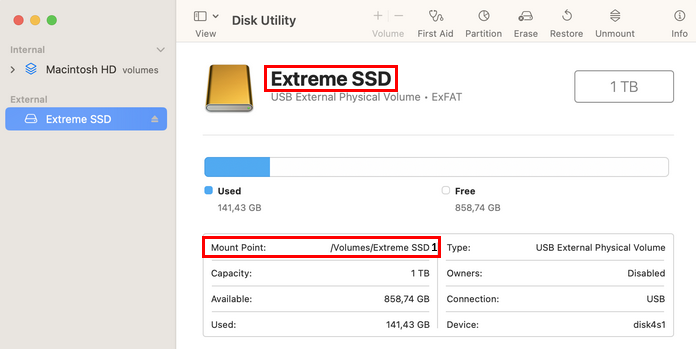
- Check if the Volume Name of the hard drive matches the Mount Point.
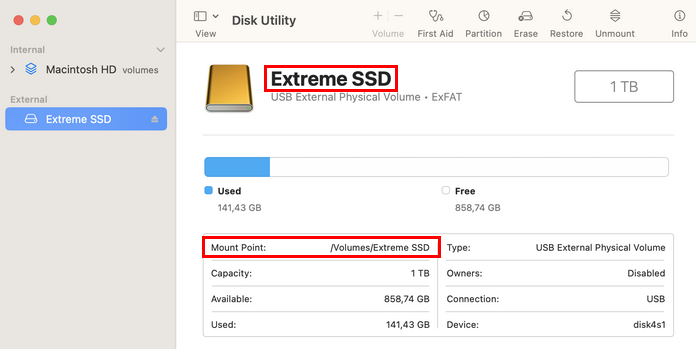
- If there is no number added to Mount Point (as shown above), the products should work as expected again.
- If there is a number added to the hard drive name in the Mount Point entry (see below), please contact Apple Support to help you with this issue. Some users reported that this Apple Support article helped - but please be cautious and proceed at your own risk.
Was this article helpful?
That’s Great!
Thank you for your feedback
Sorry! We couldn't be helpful
Thank you for your feedback
Feedback sent
We appreciate your effort and will try to fix the article