
Komplete 26
The following Plugin Alliance products are included in the Komplete 26 bundles:
| Product | K26 Standard | K26 Ultimate | K26 Ultimate CE |
| bx_clipper | - | Yes | Yes |
| bx_console AMEK 200 | - | - | Yes |
| bx_enhancer | Yes | Yes | Yes |
| bx_glue | Yes | Yes | |
| bx_masterdesk PRO | - | - | Yes |
| bx_XL V3 | - | Yes | Yes |
Yes
Installation for Komplete 26:
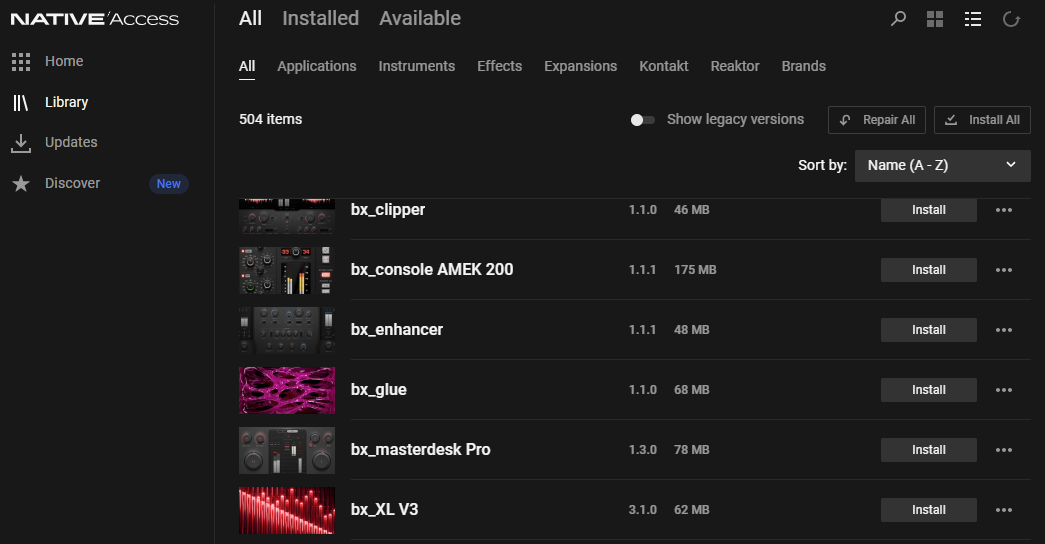
All the Plugin Alliance products included with Komplete 26 can be installed via Native Access:
Komplete 15
The following Plugin Alliance products are included in the Komplete 15 bundles:
| Product | K15 Standard | K15 Ultimate | K15 Ultimate CE |
| bx_crispytuner | Yes | Yes | Yes |
| bx_Oberhausen | Yes | Yes | Yes |
| LO-FI-AF | Yes | Yes | Yes |
| bx_console N | - | Yes | Yes |
| bx_limiter True Peak | - | Yes | Yes |
| bx_console Focusrite | - | - | Yes |
| Knifonium | - | - | Yes |
Installation for Komplete 15:
Please follow these steps in order to register and install your products:
- Please create an account at Plugin Alliance, if you haven't already.
- Add your Komplete bundle to the cart from this list: https://www.plugin-alliance.com/pages/redeem
Please don't add any other products to the cart. - Click Checkout.
- Enter the code that you have received in the Komplete 15 order confirmation email. This will bring the cost of the bundle down to $0.
- Check out.
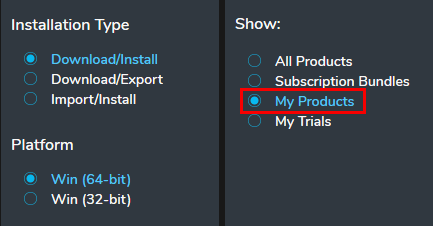
- Download the Plugin Alliance Installation Manager and log in.
- Go to My Products to find your products.
Was this article helpful?
That’s Great!
Thank you for your feedback
Sorry! We couldn't be helpful
Thank you for your feedback
Feedback sent
We appreciate your effort and will try to fix the article