After your purchase, you will receive an order confirmation by e-mail. This e-mail includes your serial number.
Follow these steps to register and install your iZotope product:
- Once you have received the confirmation e-mail, go to the iZotope website and log in with your iZotope account credentials or create an account (if you haven't already).
- Download and install iZotope's deployment tool Product Portal.
- After the installation, start Product Portal and log in with your iZotope account credentials.
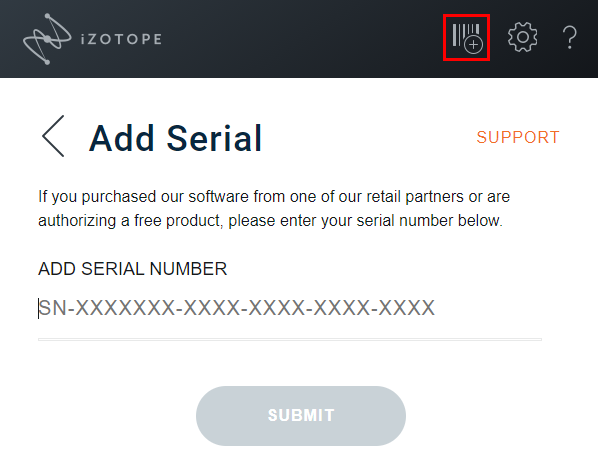
- Click on the plus icon in the upper right, enter your serial number and click SUBMIT.
- Open MY PRODUCTS > INSTALL/AUTHORIZE.
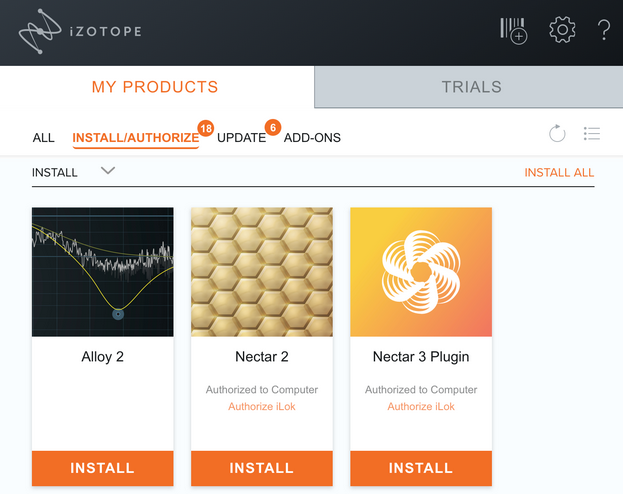
- Click INSTALL on the product you want to install, or click INSTALL ALL to install all of the products.
Was this article helpful?
That’s Great!
Thank you for your feedback
Sorry! We couldn't be helpful
Thank you for your feedback
Feedback sent
We appreciate your effort and will try to fix the article