Native Access Error Message: Download Failed: "Unknown error"
Symptom
When attempting to install a product from the Not installed tab, the download fails and the following error message is displayed:
Download failed
Downloading *product name* failed: Unknown error.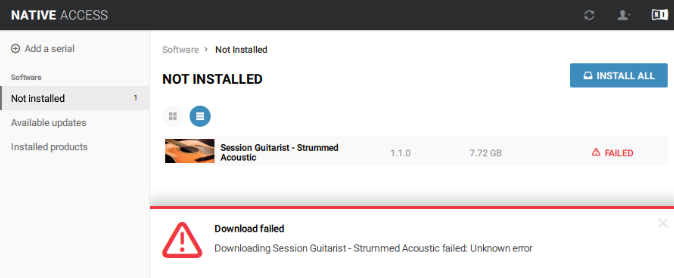
Solutions
Please note that this version of Native Access is outdated.
Please try the new Native Access to solve the issue. You can download it here: https://www.native-instruments.com/specials/native-access-2/
If you have to use the old Native Access version (because you're on an unsupported operating system): the solutions below have resolved the issue in most cases:
1. Delete files with the extension "iso" or "aria"
- Close all applications, keeping Native Access open.
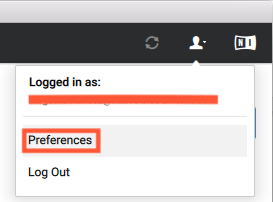
- In Native Access, click the User icon and select Preferences.
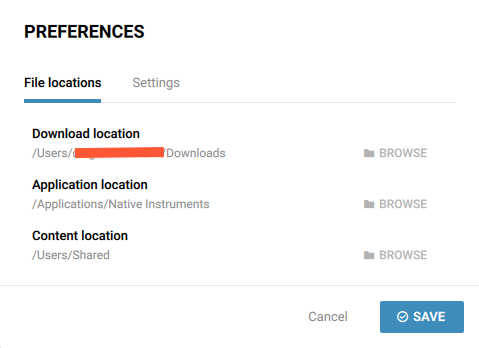
- Make sure that all three File locations - Download, Application and Content - are set to different folders. You can change the location if needed by clicking the BROWSE button next to the corresponding location. Click SAVE to confirm the changes.
Note: changing the Application location to another file path can cause issues. We recommend keeping it at the default setting.
- Close Native Access
- Open the folder you have set as Download location and delete any files with the extension "iso" or "aria" (see example below).

- Restart your computer.
- Open Native Access and start the installation again.
2. Full Disk Access
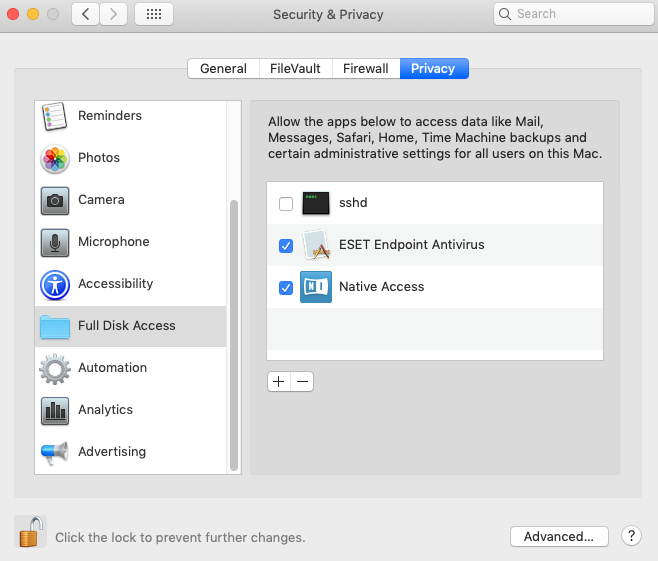
- Open your Mac's System Preferences and click Security & Privacy.
- Under the Privacy tab, choose Full Disk Access from the side bar.
- Click the lock icon in the bottom left of the window and enter your Mac password.
- Ensure that Native Access appears in the list.
If it does not appear in this list, click the + icon and add the following location:
Mac HD: Applications > Native Access - Once completed, click the lock icon again. The installation will now function correctly in Native Access.
Was this article helpful?
That’s Great!
Thank you for your feedback
Sorry! We couldn't be helpful
Thank you for your feedback
Feedback sent
We appreciate your effort and will try to fix the article