Native Access Installation Error: "Fatal Error: Can't write..." (Windows)
While installing an NI Product, the installation process fails and the following error message is displayed:
NI InstallAware Plugin
FATAL ERROR: Can't write...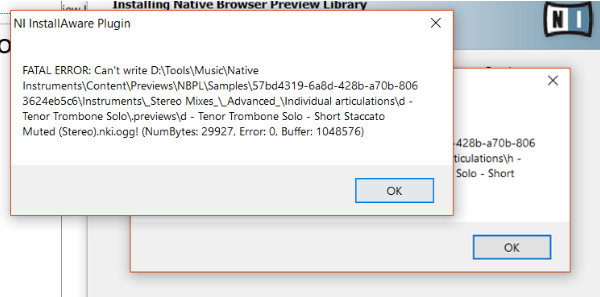
TABLE OF CONTENTS
Cause
The Windows system files that relate to the installation of an NI product may be corrupted.
Solutions
1. Reset your temporary installation folder
- Navigate to the following location on your system:
C: > Users > *your username* > AppData > Local > TempNote: The temporary folder is hidden by default. Learn how to show hidden files and folders in this article.
- Select all files and folders in the Temp folder by pressing Ctrl+A on your keyboard.
- Delete all selected items by right-clicking and selecting Delete from the context menu. Note that some files and folders cannot be deleted.
- Reinstall the NI product.
If this solution does not help, continue as explained below.
2. Run the System Integrity Checker
Please run the Windows file checker tool on your system as explained in this Microsoft article.
If this solution does not help, continue as explained below.
3. Limitation of file path length
The issue may also occur if the entire path where the installation files are created exceeds the limit length defined in Windows. In this case, make sure that the path that stores your content products is shortened:
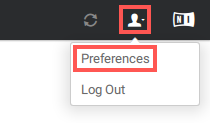
- In Native Access, select Preferences from the user drop-down menu.
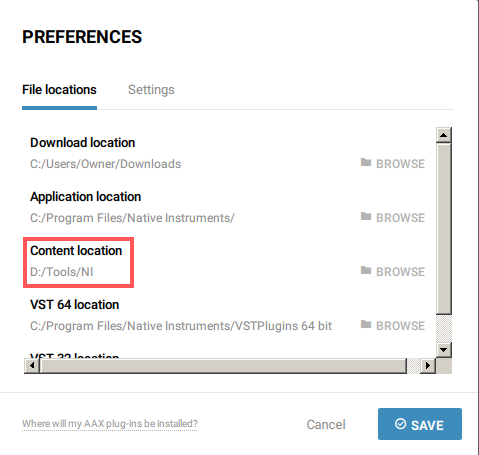
- Under File locations, choose a different folder on your hard drive as Content location. Please make sure that the path is as short as possible. In this example we are setting it to the folder D:/Tools/NI, since this path is much shorter than the previously set path 'D: > Tools > Music > Native Instruments > Content' (see error message above).
- Install the product once again.
Was this article helpful?
That’s Great!
Thank you for your feedback
Sorry! We couldn't be helpful
Thank you for your feedback
Feedback sent
We appreciate your effort and will try to fix the article