Traktor Pro 4 | Crash on startup: Fixing streaming folder permissions for Beatport/Beatsource
When starting Traktor Pro 4, the application can crash immediately during the startup sequence and fail to open. This can be caused by incorrect permissions within the __guest folders for Streaming/Beatport and Streaming/Beatsource.
Please follow these steps to reset the __guest folders:
1. Before launching Traktor, verify your network:
- Make sure Internet/Wi-Fi is ON and you have a stable connection.
- Ensure there are no access restrictions to Beatport/Beatsource services.
2. Try to launch Traktor.
- It may crash during the first startup.
- Once it crashes, make sure Traktor is completely closed.
Now, please navigate to the Beatport folder and Beatsource folder, depending on your operating system:
macOS:
- Click Go in the Finder menu bar while holding down the option / alt key on the computer keyboard. Choose the Library entry that appears in the drop-down menu. This will open the 'User Library' folder.
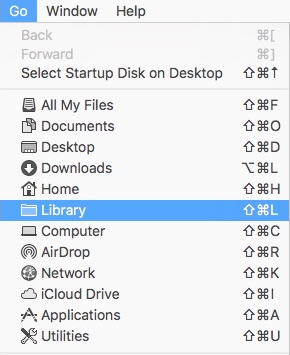
- In the Library folder, navigate to the following locations:
Application Support > Native Instruments > Traktor > Streaming > Beatport
Application Support > Native Instruments > Traktor > Streaming > Beatsource - Delete the __guest folders in both paths.
- Launch Traktor again.
- New __guest folders will be created automatically.
Windows:
- Click on the Windows start button in the bottom left of your screen.
- Type "%localappdata%" and click on the option that appears. This will open the 'Local' folder.
- In the Local folder, navigate to the following locations:
Native Instruments > Traktor > Streaming > Beatport
Native Instruments > Traktor > Streaming > Beatsource - Delete the __guest folders in both paths.
- Launch Traktor again.
- New __guest folders will be created automatically.
Was this article helpful?
That’s Great!
Thank you for your feedback
Sorry! We couldn't be helpful
Thank you for your feedback
Feedback sent
We appreciate your effort and will try to fix the article