IMPORTANT: Traktor Play is a streamlined version of the full Traktor Pro 4 license. If you already own Traktor Pro 4, Traktor Play will not be triggered as shown below, as you already own the full version of Traktor Pro 4. Traktor Pro 4 is fully compatible with the controllers below, so please use Traktor Pro 4.
AlphaTheta DDJ FLX-4 and DDJ FLX-2
As the owner of an AlphaTheta DDJ FLX-4 or DDJ FLX-2 you can install a free copy of Traktor Play with a few simple steps:
- Download, install and start Native Access.
- Log in or create an account if you haven't already.
- Connect your DDJ FLX controller with your computer.
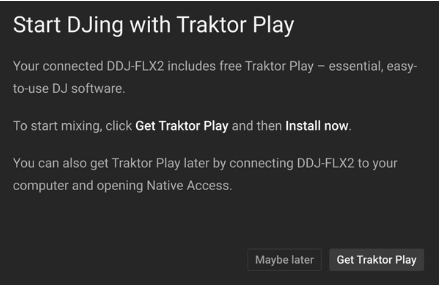
- Native Access shows this screen - click Get Traktor Play:
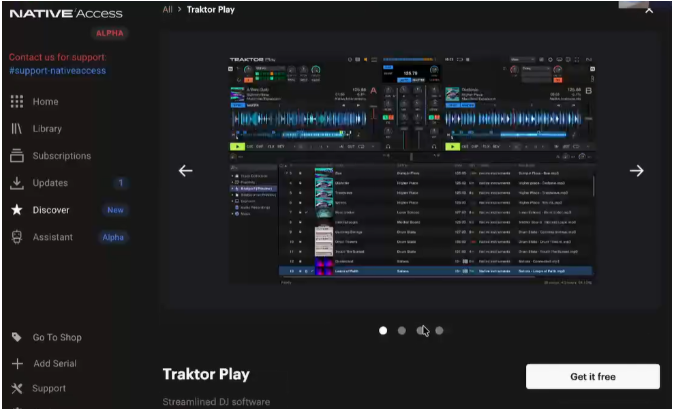
- On the next screen, click Get it free:
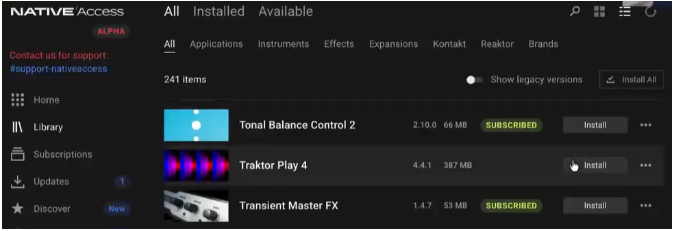
- Open the Library tab, find Traktor Play and click Install:
- Traktor Play is now installed on your system. You can close Native Access.
You can also install Traktor Play later for free. Simply open Native Access and connect your DDJ FLX controller. Then follow the steps above.
Was this article helpful?
That’s Great!
Thank you for your feedback
Sorry! We couldn't be helpful
Thank you for your feedback
Feedback sent
We appreciate your effort and will try to fix the article