If your NI Traktor controller is not being recognized in TRAKTOR (for example, the MIDI indicator does not respond), follow the steps below to get the device connected and working properly.
TABLE OF CONTENTS
- Check for Software Updates
- Install Latest Driver / Firmware
- Restore Default Controller Settings
- Check USB Connection
- Reinstall the Latest Controller Editor
Check for Software Updates
- Open Native Access
- Install the latest version of TRAKTOR
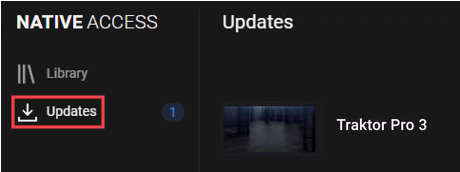
This is important because the TRAKTOR software is updated along with the release of a new TRAKTOR controller. If your TRAKTOR software predates the hardware controller, the device may not be recognized or function as expected.
Install Latest Driver / Firmware
- Visit the NI Support Downloads page
- Locate your specific controller
- Install:
- Latest driver (if required)
- Latest firmware / updater tool
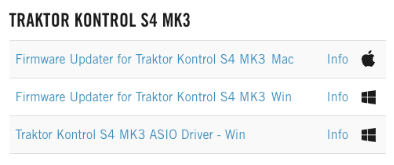
Note: Some devices are class-compliant and do not require drivers.
Restore Default Controller Settings
- Disconnect the controller.
- Start TRAKTOR and go to Preferences.
- Select the name of your TRAKTOR controller and click the option to Restore Default.
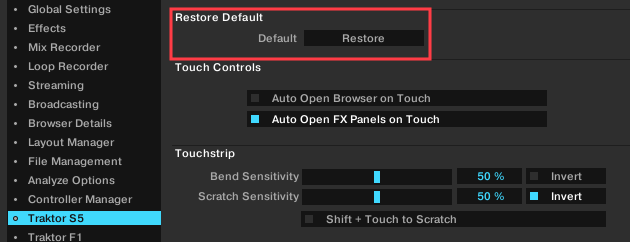
Note: For TRAKTOR KONTROL X1 MK2, go to Preferences > Controller Manager > Device and select the Traktor.Kontrol X1 MK2.Default. Select Delete from the Edit menu, then reconnect the X1 MK2.
- Confirm that you want to reset your controller by clicking Yes.
- Reconnect your controller. TRAKTOR will automatically detect the controller and load its default mapping.
Check USB Connection
- If connecting to an external USB hub, try removing the hub and connecting your TRAKTOR controller directly to the computer.
- Try connecting the TRAKTOR controller to each available USB port on the computer.
- Try using different USB cables with your TRAKTOR controller. See this article for more information about USB cable types.
Reinstall the Latest Controller Editor
- Disconnect the controller
- Download and install the latest Controller Editor
- Reconnect the device
This installs required background services (NIHardwareAgent) used by NI hardware.
Was this article helpful?
That’s Great!
Thank you for your feedback
Sorry! We couldn't be helpful
Thank you for your feedback
Feedback sent
We appreciate your effort and will try to fix the article