Aslice is a service that allows performing DJs to share their fees with the artists who create the music they play in their sets. You can find more info and sign up on the Aslice homepage.
Please follow these steps in order to send a TRAKTOR playlist to Aslice:
1. In TRAKTOR's Browser Tree, open the Playlists menu.
2. Right-click the playlist title you want to share and select Send to Aslice.
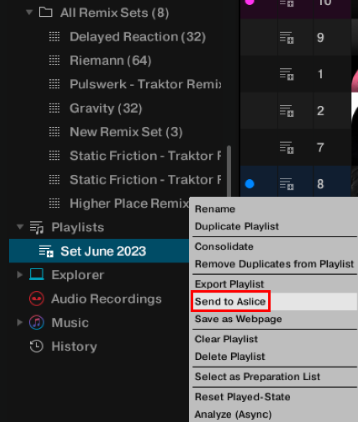
TRAKTOR now opens the Aslice software and automatically imports your playlist, including artist names and track titles.
Was this article helpful?
That’s Great!
Thank you for your feedback
Sorry! We couldn't be helpful
Thank you for your feedback
Feedback sent
We appreciate your effort and will try to fix the article