I Cannot Find the ASIO Driver for My TRAKTOR KONTROL S2 MK3 / S4 MK3 / S3 (Windows)
TABLE OF CONTENTS
Symptom
After the installation of TRAKTOR PRO 3 and setting up the TRAKTOR KONTROL S2 MK3 / S4 MK3 / S3 controller, you hear no sound when playing a track and cannot select an ASIO driver in TRAKTOR's preferences.
Cause
Unlike former TRAKTOR controllers, the S2 MK3 / S4 MK3 / S3 uses Windows' own 'WASAPI (Exclusive)' driver. In order to be able to use this WASAPI driver, the latest Windows 10 update (64-bit) needs to be installed.
Solution
- Install the latest update for Windows 10 (64-bit). You can find this option in: Settings > Updates & security > Windows Update > Check for Updates
- Connect your S2 MK3 /S4 MK3 / S3 and start TRAKTOR PRO 3
- Open Preferences > Audio Setup
- Click the drop down menu next to Audio Device and select:
Traktor Kontrol S2 MK3 (WASAPI (Exclusive Mode)) or
Traktor Kontrol S4 MK3 (WASAPI (Exclusive Mode)) or
Traktor Kontrol S3 (WASAPI (Exclusive Mode))
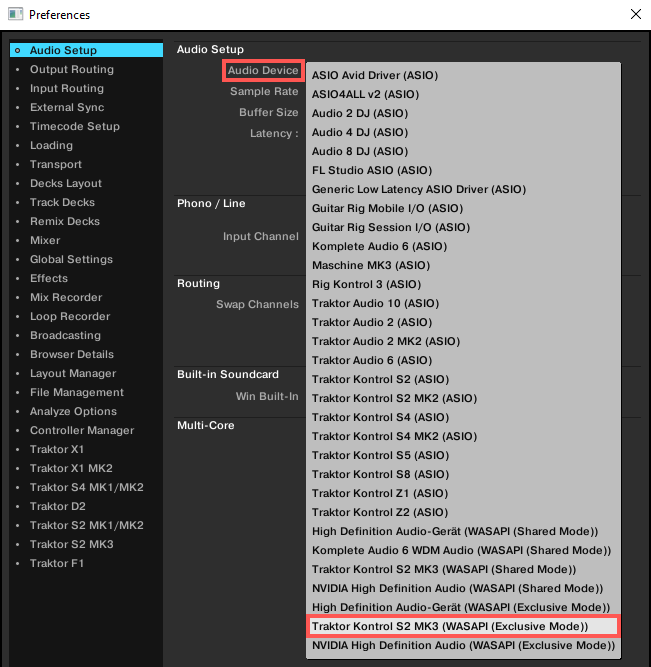
Now the TRAKTOR KONTROL S2 MK3 / S4 MK3 / S3 should work as expected.
Note: If you are experiencing high latency with your TRAKTOR KONTROL S2 MK3 / S4 MK3, you can try to reduce it by installing the ASIO driver. You can find the driver installer here:
- C: > Program Files > Native Instruments > Traktor Pro 3 > Drivers
After the installation you can select the ASIO driver in TRAKTOR's Preferences > Audio Setup.
Was this article helpful?
That’s Great!
Thank you for your feedback
Sorry! We couldn't be helpful
Thank you for your feedback
Feedback sent
We appreciate your effort and will try to fix the article