The Kontakt 8 Library browser shows 6 new categories. Please read on to learn more about them.
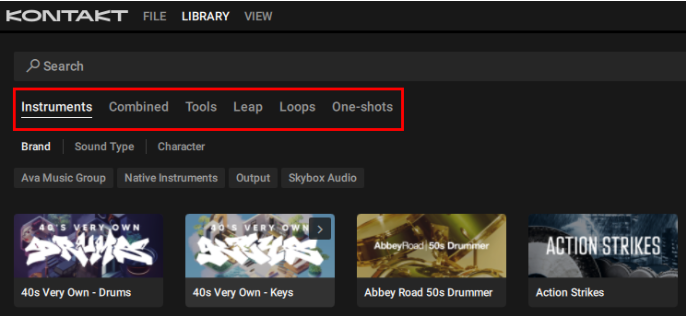
Instruments
The Instruments category is where you can browse all the Kontakt instruments you have installed on your computer. Our vast collection on the Native Instruments website includes pianos, drums and percussion, orchestral instruments, synthesizers, and more. Once installed through Native Access they will show up here under Instruments.
Combined
The Combined category gives you access to presets containing multiple instruments, and the brand new Tool-enhanced presets. These combine instruments with Tools that transform your playing in inspiring ways. Included in Kontakt 8 are the Chords Tool and the Phrases Tool.
Tools
In the Tools category you will find our new Tools, Chords and Phrases. The Chords Tool comes with more than 100 chord sets, and the Phrases Tool offers more than 100 phrase sets, covering a wide range of different genres and styles. Both Tools give you exciting features to manipulate the chords and phrases and real time.
Leap
The Leap category is where you can browse Expansions with kits ready to be loaded in our new Leap sampler. Use its engines to make each sound your own, and create exciting performances with Macro knobs and black keys effect. Get inspired by our Expansions, each dedicated to a certain genre, mood, or style, or use Leap to create your own kits. You can buy more Expansions on the Native Instruments website. Once installed through Native Access they will show up here under Leap.
Loops
The Loops category contains all your audio loops, such as riffs, motifs, drums loops, and more. These loops are part of the Expansions you have installed on your computer. You can buy more Expansions on the Native Instruments website. Once installed through Native Access the included audio loops will show up here under Loops, ready to be combined and played using Leap.
One-shots
The One Shots category contains all your single sound samples, such as drum hits, keys, synths, guitars, basses, and more. These samples are part of the Expansions you have installed on your computer. You can buy more Expansions on the Native Instruments website. Once installed through Native Access the included samples will show up here under One Shots, ready to be combined and played using Leap.
Was this article helpful?
That’s Great!
Thank you for your feedback
Sorry! We couldn't be helpful
Thank you for your feedback
Feedback sent
We appreciate your effort and will try to fix the article