In this article, we explain how to replace an older NI plug-in with a new updated version in your DAW project. This applies only to major NI software updates, such as purchasing an update from "version 5" to "version 6".
Follow this guide to save a preset and replace the old NI plug-in within your DAW project.
Saving Your Plug-In Sound as a Preset
- Open your DAW and load the project containing the older NI plug-in.
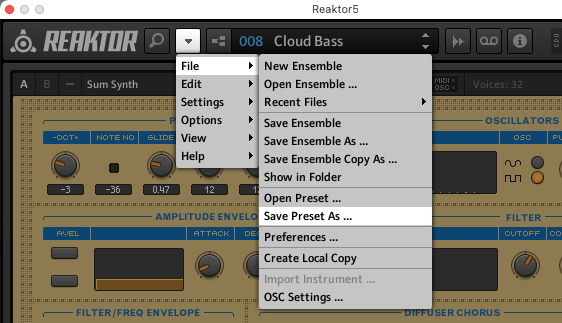
- Open the older NI plug-in window and use its File menu to save a preset. This is to save your edits in the plug-in. In this example, the old NI plug-in is REAKTOR 5.
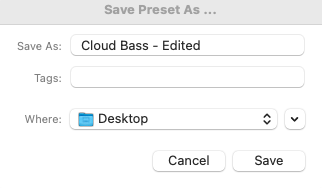
- Name your custom preset and save it to a location easy to find, such as your computer's Desktop.
Reloading Your Preset and Resaving the Project
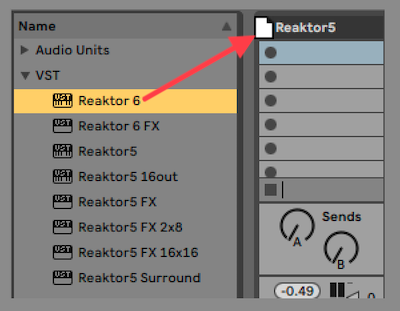
- Replace the old NI plug-in with its newer version in your project. In this example, the new NI plug-in is REAKTOR 6.
Note: The DAW used in this article may be different than yours, but the procedure is similar with any DAW.
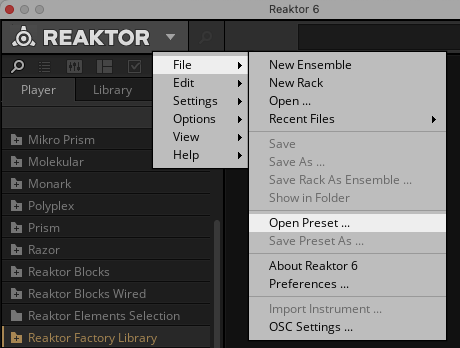
- Open the newer NI plug-in window and use its File menu to load your preset. Use the pop-up window to select the preset file (e.g. from the Desktop).
- Play your DAW project to make sure that your custom preset sounds right and plays back properly.
- Now you can re-save a new copy of your DAW project and continue with the new version of your NI plug-in.
Note: To retain a backup of the original project, you can save a new version by giving the project a slightly different name (e.g. "Project Name - New").
Was this article helpful?
That’s Great!
Thank you for your feedback
Sorry! We couldn't be helpful
Thank you for your feedback
Feedback sent
We appreciate your effort and will try to fix the article