This article explains how to send MIDI notes from your Maschine controller and record them directly in Cubase. This is helpful when you want to use Cubase MIDI tracks to play the sounds loaded in Maschine.
Note: This process is not restricted to the Maschine software. You can also use your Maschine controller pads to play other VST plug-ins on additional Cubase tracks.
TABLE OF CONTENTS
- Cubase MIDI settings
- Maschine Software MIDI Input
- Maschine MIDI Mode and Recording in Cubase
- About Maschine Pads and MIDI Keymapping
Cubase MIDI settings
- Connect the Maschine controller to your computer and open the Cubase MIDI settings under Studio > Studio Setup.
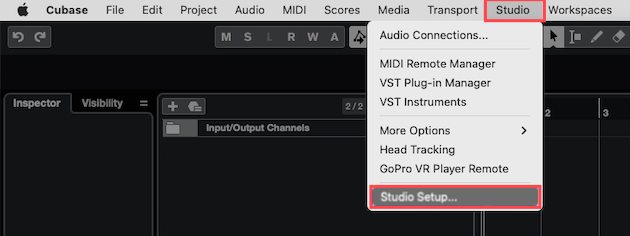
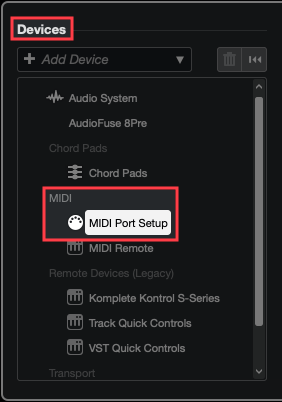
- Go to Devices > MIDI and click MIDI Port Setup.
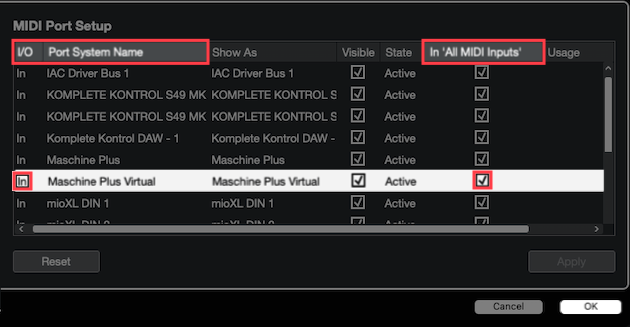
Locate the I/O > In (Input) port and tick the box under In 'All MIDI Inputs' for your Maschine controller. In this example, Maschine Plus Virtual is enabled because this Maschine device is connecting and transmitting MIDI to this computer via USB.
- Click OK to close the Cubase Studio Setup.
Please proceed to the next chapter below for instructions to set the MASCHINE software to receive MIDI note input.
Maschine Software MIDI Input
- Load Maschine in Cubase as a plug-in.
- Open the Maschine plug-in and load a Group (Kit).
- Click the Maschine Channel icon and select Group > Input.
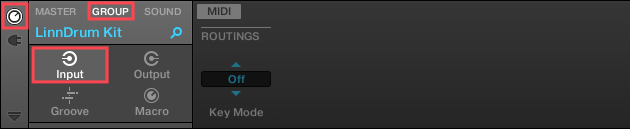
- In the MIDI > ROUTINGS menu, set the Key Mode to Manual and set the Source to Host.
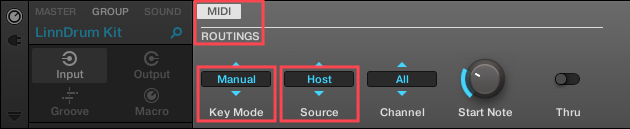
Note: You can leave Channel set to All if loading just one MASCHINE Group (Kit). Otherwise, set a MIDI Channel for each Group (Kit) being loaded.
Please proceed to the next chapter below for instructions to play and record MIDI in a Cubase track.
Maschine MIDI Mode and Recording in Cubase
Before proceeding, switch your Maschine controller to MIDI mode. You can find the button combination for your controller in this list:
| Controller Model | MIDI Mode Button Combo |
| Maschine MK1 / MK2 | SHIFT + CONTROL |
| Maschine MK3 / + (PLUS*) | SHIFT + CHANNEL (MIDI) |
| Maschine Mikro MK1 / MK2 | SHIFT + F1 |
| Maschine Mikro MK3 | SHIFT + Project button |
| Maschine Studio | SHIFT + CHANNEL |
| Maschine Jam | SHIFT + headphones button (MIDI) |
- Click the red tab to record-enable the Cubase track where Maschine is loaded.
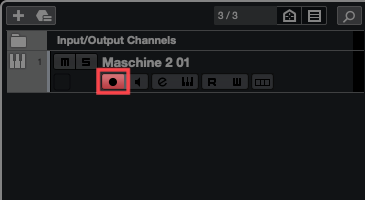
- Click Play and Record on the Cubase Transport bar.

Note: You can also enable the Cubase Metronome.
- Play the Drum Kit with your Maschine pads and the notes will be recorded directly in the Cubase track.
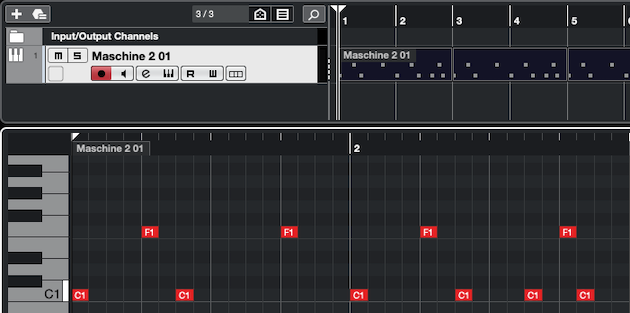
Note: If your Maschine pads are not triggering any of the sounds, please continue to the next chapter below.
About Maschine Pads and MIDI Keymapping
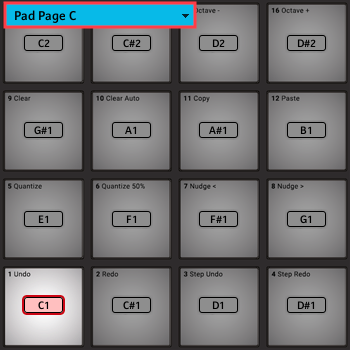
The Maschine pads are just like piano keys on a keyboard. Each Sound on a pad within a Maschine Group (Drum Kit) is assigned to its own separate note on the MIDI Keymap. The standard range of these notes for the factory Maschine Groups (Drum Kits) is typically C1 to D#2.
Setting Maschine Pads to the Correct Octave
While your Maschine controller is in MIDI Mode, press the GROUP button marked with the letter C. 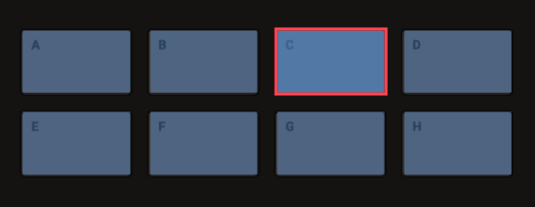
Note: On a Maschine Mikro MK3, hold down the GROUP button and press the Maschine Pad marked with the letter C (i.e. Pad 15).
Now the Maschine pads are transposed into the correct MIDI note-range (or octave) on the keymap, where the first pad (1) corresponds with MIDI note C1, the second pad (2) corresponds with C#1, pad 3 is D1, and so forth.
Was this article helpful?
That’s Great!
Thank you for your feedback
Sorry! We couldn't be helpful
Thank you for your feedback
Feedback sent
We appreciate your effort and will try to fix the article