Native Instruments | How to Import Third-Party Sounds in Absynth/ FM8 / Massive
This article shows how to import 3rd-party presets in Absynth, FM8, and Massive.
Note: Absynth, FM8, and Massive(original) each utilize the same type of preset and file browsing systems. This article applies to all 3 instruments in the same context. Massivewill be used in this example.
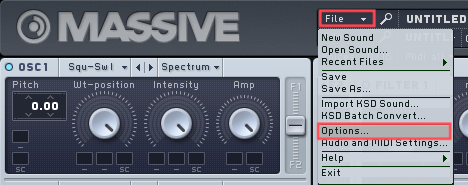
- Start Massive, then select File > Options.
- In Options, go to the Browser tab and click Add.
In FM8 Options, click the Database tab.
A new window will open where you can select the folder on your hard drive containing the 3rd-party presets (in this example a folder named Arps and Sequences). The respective entry will be added to the User Library Directories: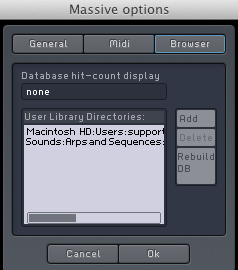
- Click on Rebuild DB followed by OK to close the Options.
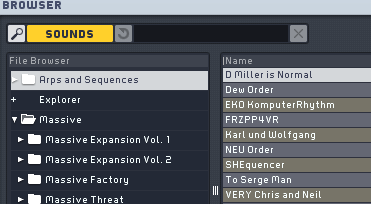
- Once the database rebuild is complete, the new folder and its presets will become available in the File Browser of your instrument.
Was this article helpful?
That’s Great!
Thank you for your feedback
Sorry! We couldn't be helpful
Thank you for your feedback
Feedback sent
We appreciate your effort and will try to fix the article