Battery 3 content can be accessed from within Battery 4 via the Files Browser. The Files Browser allows you to search your computer's file structure for samples and Kits.
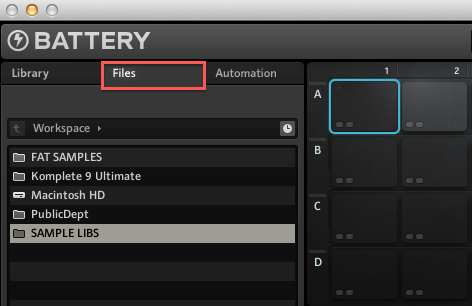
Important Note: In order to load Battery 3 Kits (.kt3) in Battery 4, follow the steps in this article.
To load content from the Battery 3 Library in Battery 4, follow the steps below:
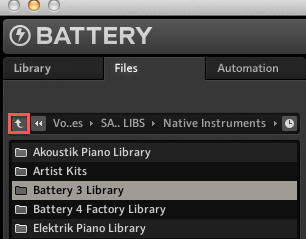
- From within the Files tab, click the "Up" button (an upwards pointing arrow symbol) within the Navigation bar to navigate to the Battery 3 Library folder on your system.
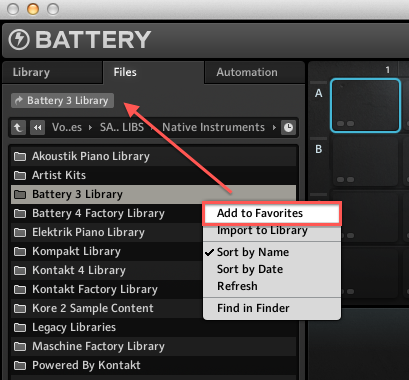
- To gain quick access to your Battery 3 Library for future use simply add its location to the Favorites bar by right-clicking the folder in the Selection/Results window, and selecting the Add to Favorites entry.
- To load a Kit, either double-click the file name (eg. Best of Krypt.kt3) or drag it to the main working area in Battery 4.
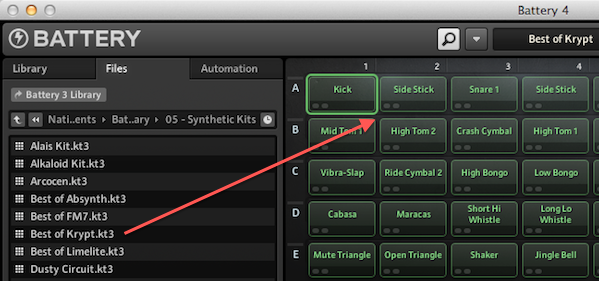
The Battery 3 Kit is now loaded in Battery 4.
Was this article helpful?
That’s Great!
Thank you for your feedback
Sorry! We couldn't be helpful
Thank you for your feedback
Feedback sent
We appreciate your effort and will try to fix the article