How to Set Up Battery to Play a Sample Until the MIDI Note is Released
Symptom
Battery always plays the sample until the end of its audio tail when triggered.
Solution
This function is commonly known as "One Shot" mode. The Volume Envelope module in Battery allows you to alter playback behaviour, so the sample playback can be stopped when the respective MIDI note is released.
To access the Volume Envelope parameters, click on the Power symbol button, and select the Envelope Mode AHDSR (Attack, Hold, Decay, Sustain, Release) to the right of the Power button.
Note: Do not select the AHD Envelope Mode. This process works only when AHDSR is enabled.
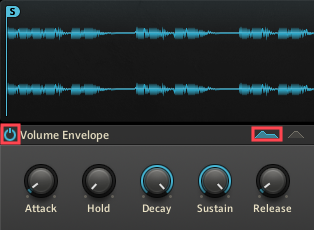
- Select the AHDSR Envelope Mode by clicking its corresponding envelope curve.
- Set the Attack parameter to a low setting such as 1.0 ms.
- Set the Hold parameter to its lowest setting (0.00 ms).
- Set the Decay parameter to its highest setting (25.0 s).
- Set the Sustain parameter to its highest setting (0.0 db).
- Set the Release parameter all the way down to 0.00 ms.
Note: If you experience an audible pop or click when releasing the MIDI note, try setting Release to a slightly higher setting (e.g. 1.0 ms or higher). Feel free to experiment with various Attack, Decay, Sustain, and Release settings to your liking.
Now the sample will only be audible as long as the MIDI note is held down.
Was this article helpful?
That’s Great!
Thank you for your feedback
Sorry! We couldn't be helpful
Thank you for your feedback
Feedback sent
We appreciate your effort and will try to fix the article