Installing the ASIO Driver for KOMPLETE AUDIO 1 / 2 / 6 MK2 (Windows)
This article explains how to install the ASIO driver for your KOMPLETE AUDIO 1 / 2 / 6 MK2 audio interface on Windows 10 systems.
Note: the KOMPLETE AUDIO 1 / 2 / 6 MK2 are 'class-compliant' on Mac computers. It is not necessary to install a driver on these systems.
- Disconnect the KOMPLETE AUDIO device from your computer.
- Navigate to our DRIVERS & OTHER FILES downloads page.
- Locate the Komplete Audio 1 & 2 Driver or the Komplete Audio 6 MK2 Driver in the list and click on the link to download it. In our example, we are showing the Komplete Audio 1 & 2 Driver:

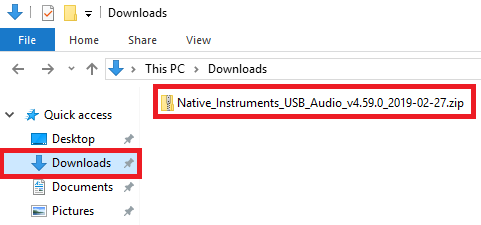
- Navigate to your downloads folder and double-click the downloaded zip file to open it:
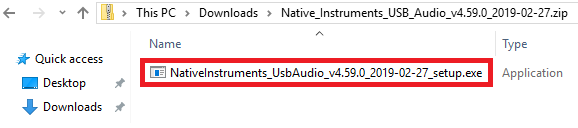
- Double click the setup.exe file and follow the onscreen prompts to complete the installation.
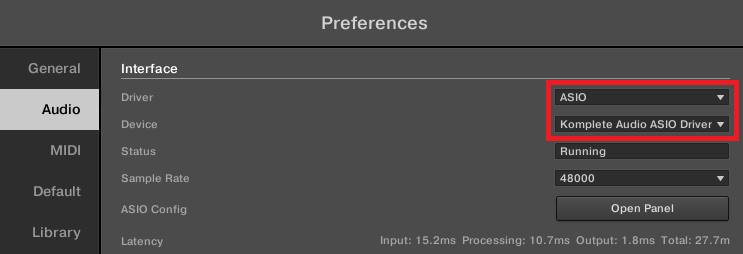
- Once complete, connect your KOMPLETE AUDIO device to your computer. You will now be able to choose the Komplete Audio ASIO Driver in your DAW.
Was this article helpful?
That’s Great!
Thank you for your feedback
Sorry! We couldn't be helpful
Thank you for your feedback
Feedback sent
We appreciate your effort and will try to fix the article