Symptom
During playback on Mac computers, the TRAKTOR waveform and other components of the software GUI freeze or stutter. If you are using TRAKTOR KONTROL S8 / S5 / D2 controllers, their displays will be equally affected.
Causes
- The sensitivity of the Touch Bar of MacBook Pro models is interfering with the TRAKTOR software operation.
- The macOS screen saver becomes active.
- The user shifts screens using the macOS Spaces function
Solutions
1. If you are using a MacBook with a touchbar, disable the 'App Control' Touch Bar settings as explained below:
- Go to your Mac System Preferences > Keyboard.
- In the Keyboard tab, select Expanded Control Strip next to Touch Bar shows.
Additionally, select Show F1, F2, etc. Keys next to Press Fn key to.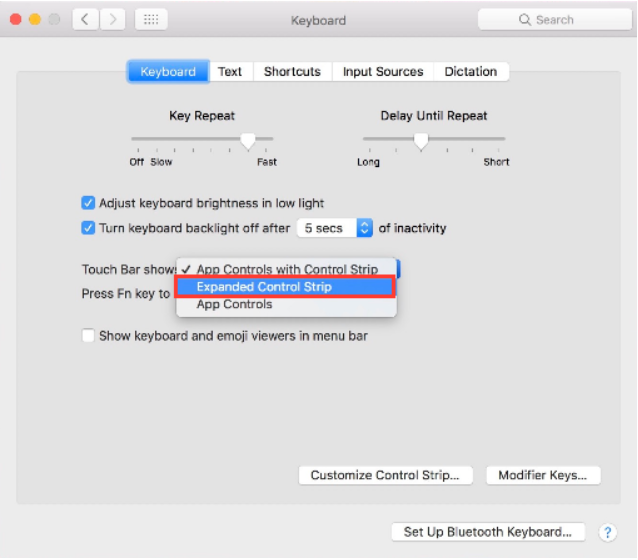
2. Disable the macOS screen saver in System Preferences > Desktop & Screen Saver.
3. Avoid switching Spaces when operating your TRAKTOR KONTROL device.
Was this article helpful?
That’s Great!
Thank you for your feedback
Sorry! We couldn't be helpful
Thank you for your feedback
Feedback sent
We appreciate your effort and will try to fix the article