My TRAKTOR KONTROL S4 MK3 Displays are not Working (Windows 10)
If your TRAKTOR KONTROL S4 MK3 screens remain blank when connected on Windows 10, this is typically caused by a missing or failed display driver installation.
TABLE OF CONTENTS
Symptom
Upon connecting your TRAKTOR KONTROL S4 MK3, the built-in displays remain blank.
Cause
The TRAKTOR KONTROL S4 MK3 display driver failed to install automatically.
Solution
Please update the display driver as explained below:
- Right-click on the Windows 10 start icon on the lower left corner of your Desktop and select Device Manager from the menu.
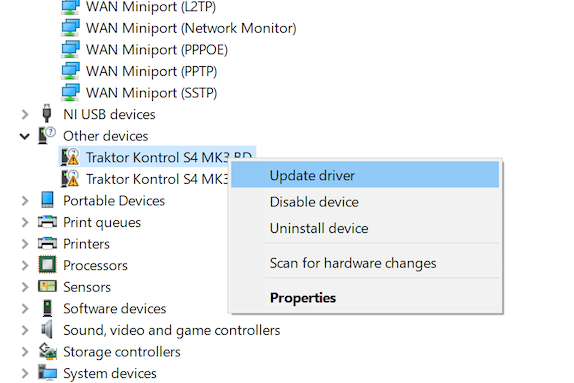
- In the Device Manager, expand the Other devices entry.
- Right-click on Traktor Kontrol S4 Mk3 BD and select Update driver from the context menu.
- Click the option Search automatically for updated driver software.
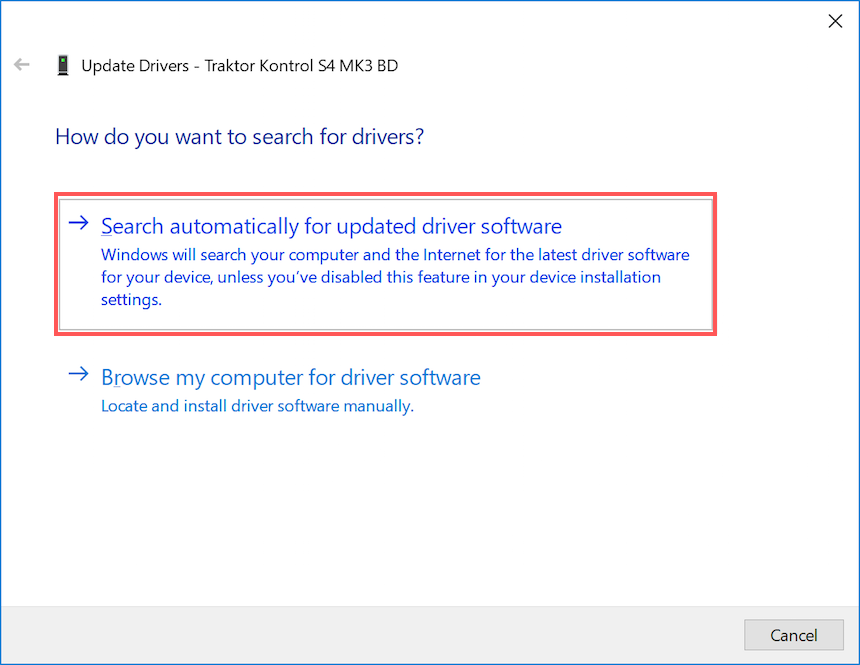
Windows automatically scans for the missing driver. After the automatic installation, the displays on the TRAKTOR KONTROL S4 MK3 will behave as expected.
Was this article helpful?
That’s Great!
Thank you for your feedback
Sorry! We couldn't be helpful
Thank you for your feedback
Feedback sent
We appreciate your effort and will try to fix the article