There are two different TRAKTOR AUDIO 2 models: The first-generation TRAKTOR AUDIO 2 Mk1 (out of production) and the second-generation TRAKTOR AUDIO 2 Mk2. View the pictures below to identify your model.
| MK1 | MK2 |
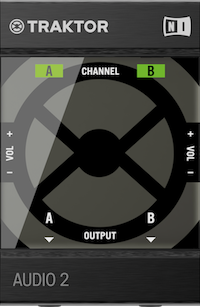 | 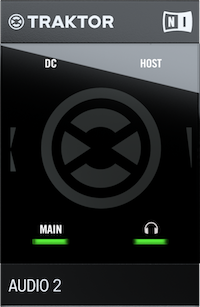 |
- If your TRAKTOR AUDIO 2 is not lighting up or is not recognized by your computer, please read this hardware troubleshooting guide.
- If the headphone signal is missing, read this article.
Using TRAKTOR AUDIO 2 Mk2 with TRAKTOR DJ on iOS
Note: Only the later-generation TRAKTOR AUDIO 2 Mk2 model offers integration with TRAKTOR DJ on an iOS device.
If you are experiencing problems with your TRAKTOR AUDIO 2 in TRAKTOR DJ, or if your TRAKTOR AUDIO 2 MK 2 is not being recognized by the iOS device, please verify the following:
- Make sure that you are using the right components in order to connect your TRAKTOR AUDIO 2 MK2 to the iOS device as explained in the article How to Connect your NI Controller / Audio Interface to an iOS Device
Was this article helpful?
That’s Great!
Thank you for your feedback
Sorry! We couldn't be helpful
Thank you for your feedback
Feedback sent
We appreciate your effort and will try to fix the article