When accessing the contents of the iTunes node in TRAKTOR's Browser, some of the titles may appear greyed out.
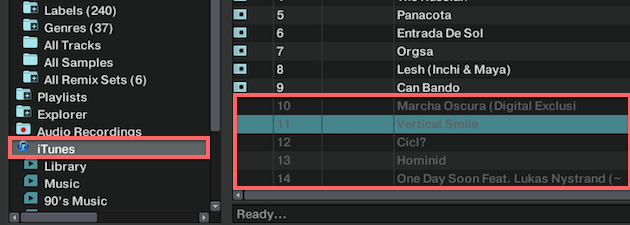
This indicates that these tracks have not been imported to TRAKTOR's Track Collection. Tracks that have already been imported to the Track Collection are not greyed out and bear a record sleeve icon in the Icons column of the playlist.
When working in the iTunes node of the TRAKTOR Browser, please consider the following:
- The tags (Title, Artist, etc.) of greyed out tracks cannot be edited but you can load and play these tracks.
- When a track is loaded into a Deck, it is added to the Track Collection.
- We recommend to edit your tags only in TRAKTOR's Track Collection. If you edit your tags directly in the iTunes application, this may lead to inconsistencies between your iTunes node and the Track Collection.
Please see the video below to learn more about importing tracks into TRAKTOR's Track Collection:
Was this article helpful?
That’s Great!
Thank you for your feedback
Sorry! We couldn't be helpful
Thank you for your feedback
Feedback sent
We appreciate your effort and will try to fix the article