Symptom
The Factory Sounds, which are included with the installation of TRAKTOR, are missing from the browser.
Solution
The Factory Sounds can be reimported as described below.
Mac:
- Navigate to the location of your Factory Sounds folder. The default directory for TRAKTOR's Factory Sounds is:
Macintosh HD > Library > Application Support > Native Instruments > Traktor 2 / Pro 3 > Factory Sounds - Select all the files in the Factory Sounds folder (press Cmd+A on your keyboard to select all).
- Open your TRAKTOR software.
- Drag and drop all the files in the Factory Sounds folder to the Track Collection icon in the TRAKTOR browser.
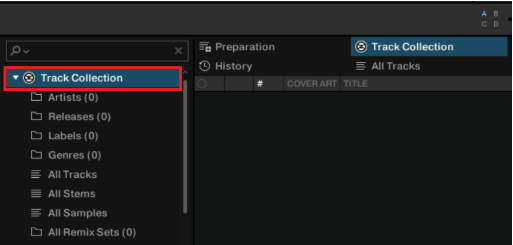
If your Factory Sounds folder does not exist, you will have to reinstall TRAKTOR from Native Access.
Windows:
- Click on the Windows start button in the bottom left of your screen.
- Type "%programdata%" and click on the option which appears.
- Navigate to the location of your Factory Sounds folder. The default directory for TRAKTOR's Factory Sounds is:
C: > ProgramData > Native Instruments > Traktor 2 / Pro 3 > Factory Sounds - Select all files in the Factory Sounds folder (press Ctrl+A on your keyboard to select all).
- Open your TRAKTOR software.
- Drag and drop all the files in the Factory Sounds folder to the Track Collection icon in the TRAKTOR browser.
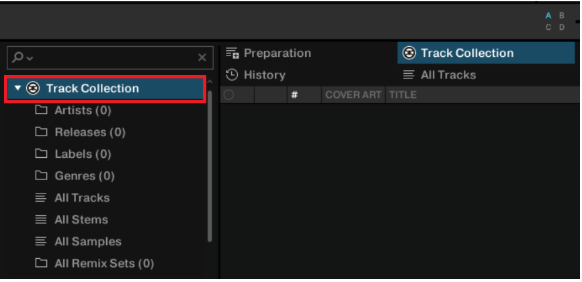
If your Factory Sounds folder does not exist, you will have to reinstall TRAKTOR from Native Access.
Was this article helpful?
That’s Great!
Thank you for your feedback
Sorry! We couldn't be helpful
Thank you for your feedback
Feedback sent
We appreciate your effort and will try to fix the article