My Kontakt library is displayed in Kontakt 7/8 'Classic View' but is missing in 'Default View'
Symptom:
A Kontakt library is displayed in 'Classic View' of Kontakt 7 or 8, but is missing in 'Default View'.
Solution:
Please reset Kontakt's database to solve the issue:
On macOS:
- Close Kontakt and all other audio apps.
- Hold down the alt key on your computer's keyboard and click Go in the Finder menu bar. Choose the appearing Library entry in the drop-down menu.
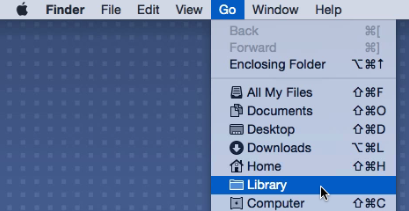
- Navigate to Application Support > Native Instruments > Native Instruments > Kontakt 7 / 8
- Rename the file komplete.db3 (for example to 'OLD_komplete.db3').
- Start Kontakt standalone (not in your DAW).
- Wait for Kontakt to update its database - this can take a few minutes. Once finished, all libraries should display correctly again.
On Windows:
- Close Kontakt and all other audio apps.
- Click on the Windows start button on the bottom left of your screen.
- CType "%localappdata%" and click the option that appears.
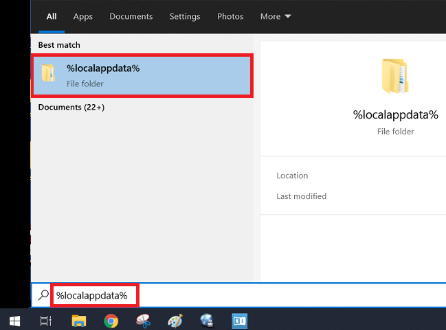
- From there, navigate to Native Instruments > Kontakt 7 / 8
- Rename the file komplete.db3 (for example to 'OLD_komplete.db3').
- Start Kontakt standalone (not in your DAW).
- Wait for Kontakt to update its database - this can take a few minutes. Once finished, all libraries should display correctly again.
Was this article helpful?
That’s Great!
Thank you for your feedback
Sorry! We couldn't be helpful
Thank you for your feedback
Feedback sent
We appreciate your effort and will try to fix the article