Kontakt | Error Message: "Your version of Kontakt is too old to load this file."
When loading a library instrument in Kontakt you may receive the following error message:
Your version of Kontakt is too old to load this file.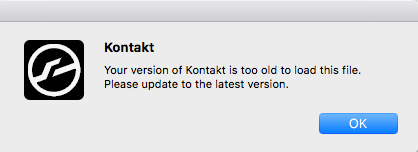
This message appears when you attempt to load a library instrument in Kontakt which had originally been saved with a newer version of the software.
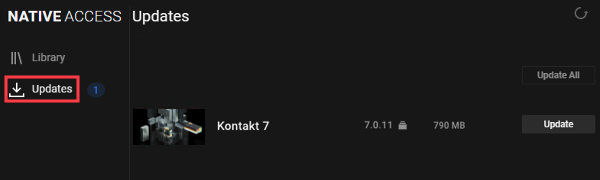
To resolve this, please install the latest Kontakt update with Native Access. Check the Updates page for the latest download version. See also the "important info" below!
On Windows, make sure that the VST plug-in path you installed the update in is assigned in your DAW. Please see the video below to learn how to administer your VST plug-ins on a Windows computer.
Important Info:
Many of our products received an update for NKS2 compatibility and polyphonic aftertouch. These library versions require the latest Kontakt 7 (Player) in order to run correctly.
The latest Kontakt 7 (Player) requires macOS 12 or higher / Windows 10/11.
There are different solutions depending on your setup:
- If you are on macOS 12 (or higher) and use Kontakt 7 (Player), please install the latest update in Native Access.
- If you are on macOS 12 (or higher) and use Kontakt 6, you can install the free Kontakt 8 Player and use it instead - or you can install the previous versions of the affected libraries via the following link: Kontakt Libraries - Previous Compatible Versions
- If you are on macOS 10.15 or macOS 11, you cannot install the latest Kontakt 7 (Player) since it's not compatible. Please install the previous versions of the affected libraries via: Kontakt Libraries - Previous Compatible Versions
- In case you simply prefer using Kontakt 6, please install the previous versions of the affected libraries via the following link: Kontakt Libraries - Previous Compatible Versions
If you have downgraded the affected libraries, please run Native Access once so that the libraries can be authorized correctly.
Was this article helpful?
That’s Great!
Thank you for your feedback
Sorry! We couldn't be helpful
Thank you for your feedback
Feedback sent
We appreciate your effort and will try to fix the article