Kontakt | Error Message: "Not Activated" or "Full Kontakt Required"
When trying to load a Kontakt Instrument, you may receive one of the following messages:
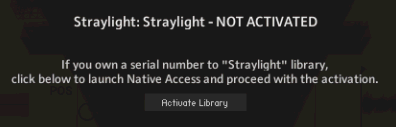
NOT ACTIVATED:
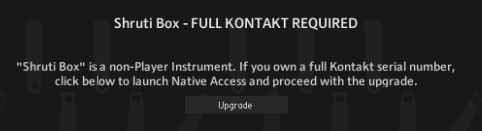
FULL Kontakt REQUIRED:
These messages usually appear for one of the following reasons:
- You are trying to load a Kontakt Instrument that has not been installed or activated.
- You are trying to load an unlicensed Kontakt Instrument in the free Kontakt Player.
The solutions are as seen below:
1. You are trying to load a Kontakt Instrument that has not been installed or activated
If you receive the message NOT ACTIVATED, click the Activate Library button to open Native Access. Go to Library > Available to find your Kontakt Instrument in the list. Once located, click Install.
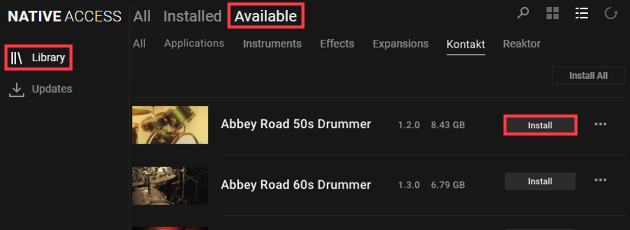
Note: If using the original version of Native Access, click the Not Installed tab.
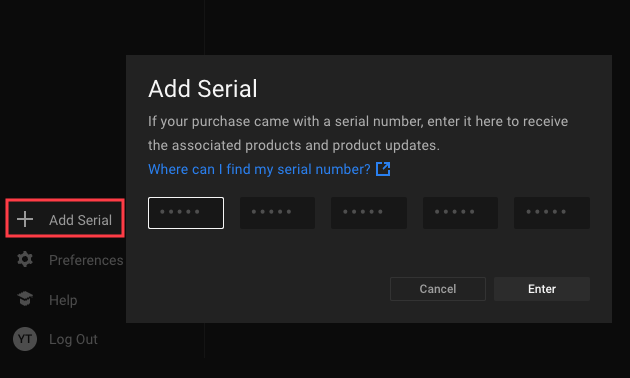
If the library is made by a third-party manufacturer, click Add Serial on the left, to add your product serial number.
2. You are trying to load an unlicensed Kontakt Instrument in the free Kontakt Player.
If you receive the message FULL KONTAKT REQUIRED, you are trying to load an unlicensed Kontakt library in the free Kontakt Player.
These unlicensed libraries can only be used with the full version of Kontakt. Usually, the third-party manufacturer mentions on their website, if the full version of Kontakt is required.
Note: Unlicensed libraries will not show in the Kontakt Libraries browser and can only be loaded from the Files tab or the Quick-Load Catalog.
If you own a full Kontakt serial number, click the Upgrade button below the error message to launch Native Access and proceed with the upgrade.
If you do not own it yet, you can purchase a full Kontakt license in our webshop.
Was this article helpful?
That’s Great!
Thank you for your feedback
Sorry! We couldn't be helpful
Thank you for your feedback
Feedback sent
We appreciate your effort and will try to fix the article