This guide explains how to back up and transfer your Quick-Load catalog in Kontakt, allowing you to restore your custom instrument, bank, and multi setups across installations or systems.
TABLE OF CONTENTS
About the Quick-Load Catalog
The Quick-Load menu in Kontakt allows you to manage and quickly load your Instruments, Banks, and Multis in a customized manner.
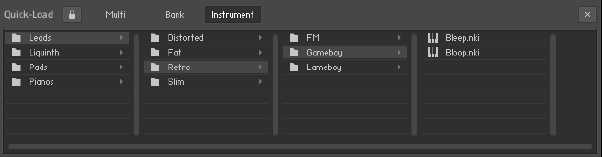 If you want to backup your Quick-Load Catalog for a reinstallation or to transfer it to a newer Kontakt version, please follow these steps:
Creating a Quick-Load Backup
macOS
- Open a Finder window and click on Go in the top menu bar, then press down the Alt key. Click the Library entry which becomes visible in the drop-down menu to access the User Library.
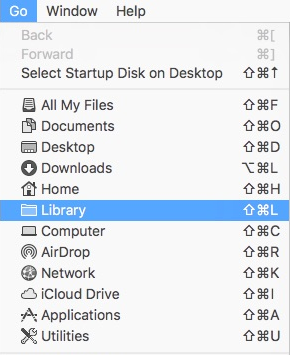
- Navigate to Library > Application Support > Native Instruments
- Open the folder for your version of Kontakt.
Note: The folder for Kontakt 6 will be named simply as "Kontakt".
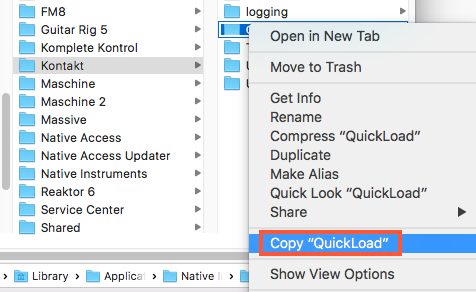 Right-click the "QuickLoad" folder to Copy it to the clipboard.
 - Paste the copied folder to e.g. your Desktop.
You can place this backup copy of the "QuickLoad" folder back into the above location after reinstalling Kontakt, or paste it into a different Kontakt version's folder in the same location.
Windows
- Open an Explorer window, navigate to the folder
C: > Users > Username > AppData > Local > Native Instruments - Open the folder for your version of Kontakt.
Note: The folder for Kontakt 6 will be named simply as "Kontakt".
Right-click the "QuickLoad" folder to Copy it to the clipboard.
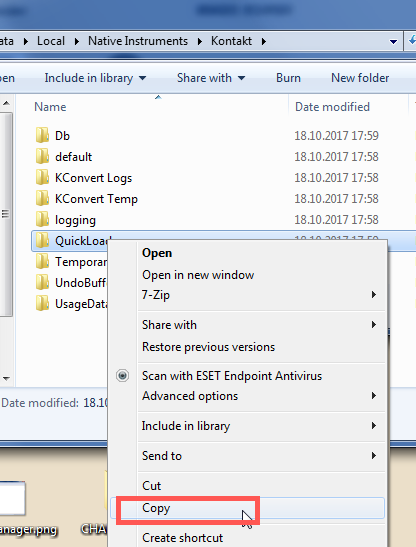
- Paste the copied folder to e.g. your Desktop.
You can place this backup copy of the "QuickLoad" folder back into the above location after reinstalling Kontakt, or paste it into a different Kontakt version's folder in the same location.
Was this article helpful?
That’s Great!
Thank you for your feedback
Sorry! We couldn't be helpful
Thank you for your feedback
Feedback sent
We appreciate your effort and will try to fix the article