Symptom
Kontakt's Instrument volume is reset when you press play or stop in your DAW.
Cause
Some DAW's are configured to send MIDI commands CC7 and CC10 when you press play or stop. Kontakt can be configured to respond to these standardized commands to reset the loaded Instrument's volume.
Solution
Follow these steps to prevent Kontakt from reacting your DAW's play / stop commands:
- Load an instance of Kontakt in your DAW.
- Load an Instrument to Kontakt's Rack.
- Press the wrench button on the upper left side of your KONTAKT Instrument.
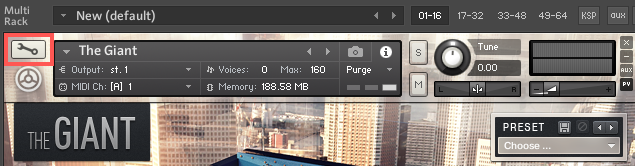
- Click Instruments Options.
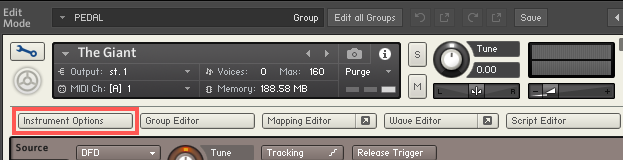
- In the Controller tab, disable the option Accept Standard Controllers for Volume and Pan.
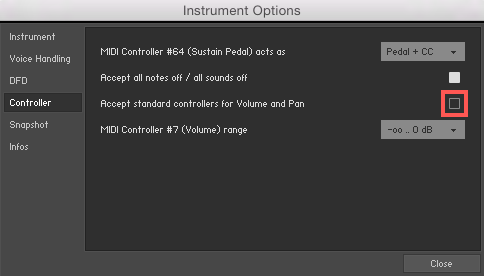
You can alternatively configure your DAW not to send the standard MIDI commands CC7 and CC10 when pressing play or pause. To learn how to do so, please consult your DAW's documentation.
Was this article helpful?
That’s Great!
Thank you for your feedback
Sorry! We couldn't be helpful
Thank you for your feedback
Feedback sent
We appreciate your effort and will try to fix the article