Symptom
When opening an NI plug-in in a DAW on Windows, the plug-in window appears broken / with glitches.
Cause
On Windows, some DAWs (e.g. Ableton Live and Cubase) support multiple display scaling factors for non-HDPI plug-ins. HDPI stands for "High Dots per Inch" image resolutions. Currently, not all NI plug-ins support HDPI.
Solution
Our developers are currently working on ensuring compatibility with our plug-ins which are not yet HDPI ready. Please check this page regularly to obtain information on any news regarding this topic! We appreciate your patience!
In the meantime, we recommend the following workarounds:
Windows System Settings
In general, you can try to use a different scaling factor in your Windows Settings > System > Display.
Ableton Live
If you encounter any issues in Ableton Live, we recommend to switch off the option Auto-Scale Plugin Window for the affected plug-ins.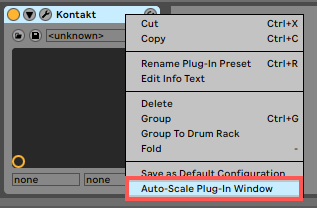
Steinberg Cubase
If you are using Cubase, click on the affected plug-in's header and switch off the option Allow Window to be Resized.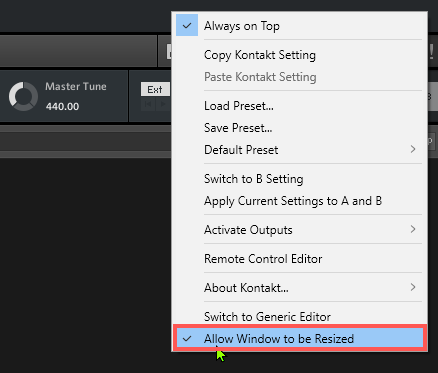
Was this article helpful?
That’s Great!
Thank you for your feedback
Sorry! We couldn't be helpful
Thank you for your feedback
Feedback sent
We appreciate your effort and will try to fix the article