このフォルダはJapaneseで表示されません。Englishでご覧ください
This guide explains how to record automation for Native Instruments plug-ins in Ableton Live using the Automation Arm function.
Record Automation in Ableton Live
To record automation follow these steps:
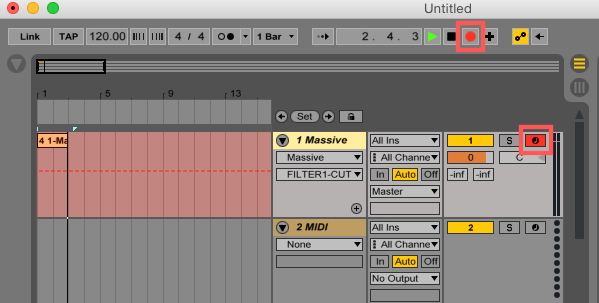
- Press the Automation Arm button.

- Press the Arm Recording button on the track where your NI plug-in is loaded and start recording by pressing the Record button in the transport section.
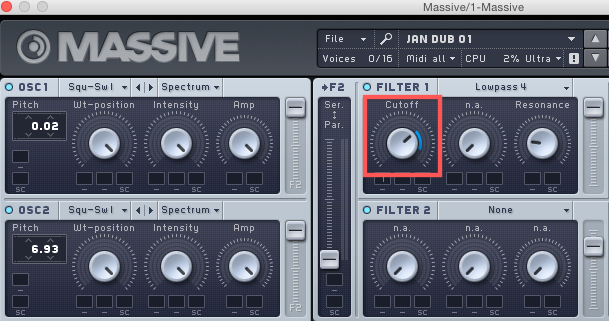
- Move the parameter you want to automate in your NI plug-in's window. In this example, we change manually the FILTER 1 Cutoff frequency in Massive.
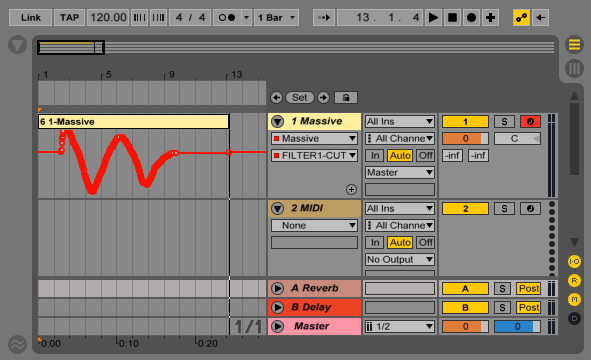
- Stop the recording. You will see the automation curve for the respective parameter, in our example FILTER 1 CUTOFF, in the Arrangement View.
To learn more about automation in Ableton Live, please read 'Chapter: Automation and Editing Envelopes' in the Ableton Live User manual. The manual is available from the Help menu within the Ableton Live application.
Was this article helpful?
That’s Great!
Thank you for your feedback
Sorry! We couldn't be helpful
Thank you for your feedback
Feedback sent
We appreciate your effort and will try to fix the article