How to Use The Mouth as a MIDI-Controlled FX in Ableton Live
This article explains how to configure The Mouth as a MIDI-controlled FX in Ableton Live. In contrast to common FX plug-ins, MIDI-controlled FX is designed to be controlled via MIDI notes, either by programming them in your sequencer track or by playing a MIDI keyboard.
- Create a MIDI track in Ableton Live.
- Create an audio track. In this example, we have named the audio track Vocals.
- Insert Reaktor FX as a VST effect plug-in on the Vocals track.
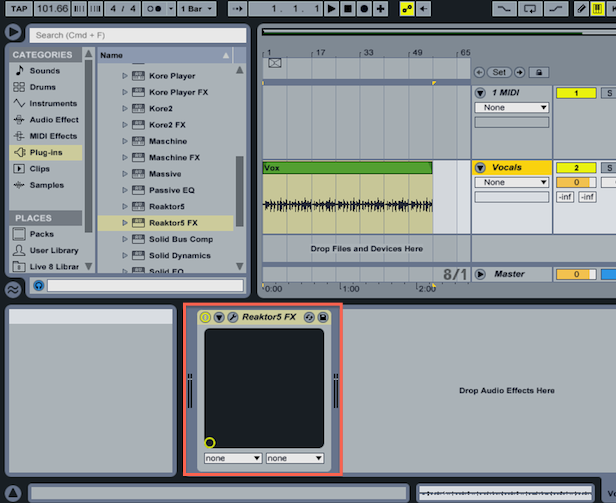
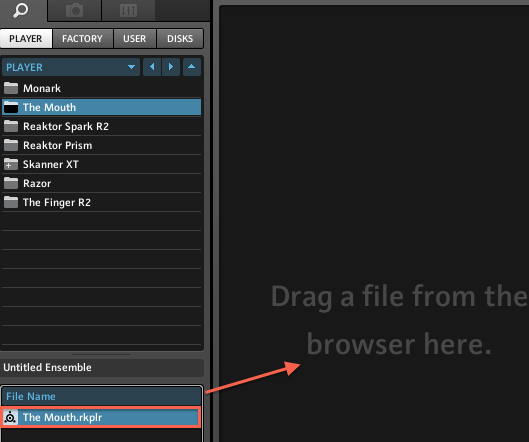
- Open up the Reaktor FX plug-in interface and load The Mouth.
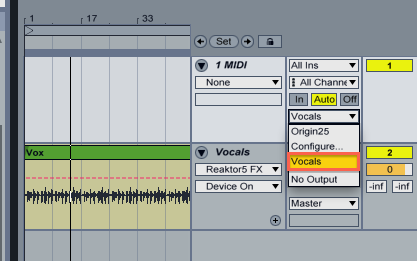
- In the Output Type drop-down menu (or the MIDI To drop-down if you are working in Live's Session View) of the MIDI track select Vocals.
- Record arm the MIDI track and set its monitor to Auto.
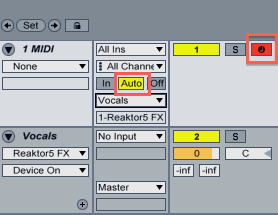
By pressing notes on your MIDI keyboard, it is now possible to change the pitch of the audio being processed by The Mouth.
Was this article helpful?
That’s Great!
Thank you for your feedback
Sorry! We couldn't be helpful
Thank you for your feedback
Feedback sent
We appreciate your effort and will try to fix the article