How Can I Create a Sidechain Compression Effect in Logic Pro ?
Sidechain compression can be useful to create a ducking or pumping effect on a particular audio source. The effect is usually triggered by a transient-heavy track (eg. a kick track).
This article will explain how to create such an effect in Logic Pro using the Native Instruments Vari Comp compressor on a bass. To demonstrate this setup, we have added two audio tracks in Logic Pro. The first track contains a kick drum playing each quarter note of a bar. The second track contains a bassline.
How to Create a Sidechain Compression Effect in Logic Pro
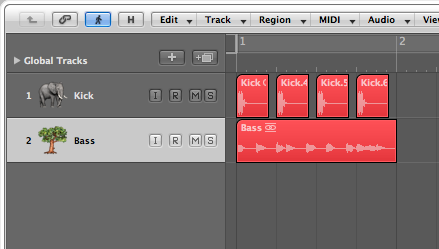
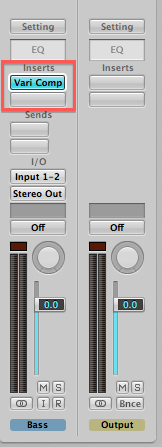
- On the bassline track, load the Vari Comp compressor as an effect plug-in.
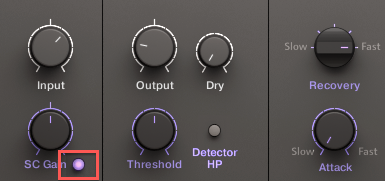
- Activate the Sidechain button (below the SC Gain knob) on the plug-in interface.
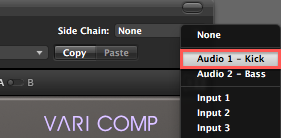
- Select Audio 1-Kick from the Side Chain drop-down menu.
- Now press PLAY in your sequencer. You should hear the Bass' volume being attenuated by the Kick track. Tweak the settings on the Vari Comp to create a strong or subtle ducking effect.
Was this article helpful?
That’s Great!
Thank you for your feedback
Sorry! We couldn't be helpful
Thank you for your feedback
Feedback sent
We appreciate your effort and will try to fix the article