How Can I Find Out the Version Number of My Native Instruments Products?
This article shows how to find out the version number of your installed Native Instruments products. You can verify the version number using any of the following methods:
TABLE OF CONTENTS
- Finding out the Version Number in the Application's 'About' Window
- Finding out the Version Number in Native Access
Finding out the Version Number in the Application's 'About' Window
- Launch your NI application (standalone) or load an instance of your NI product in your sequencer (plug-in).
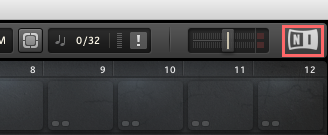
- On the application's visual interface, click on the NI logo located at the top right corner of your screen.
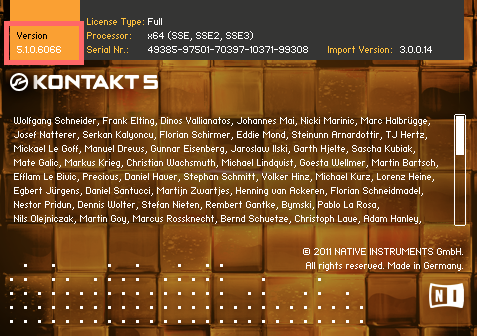
- When the "About" window displays, verify the Version number located on the top left corner. In the example below we have verified that the Kontakt version number is 5.1.0.
Finding out the Version Number in Native Access
Start Native Access from here:
macOS: Macintosh HD > Applications > Native Access.app
Windows: C: > Program Files > Native Instruments > Native Access > Native Access.exe
Native Access displays the product version number under Library > Installed.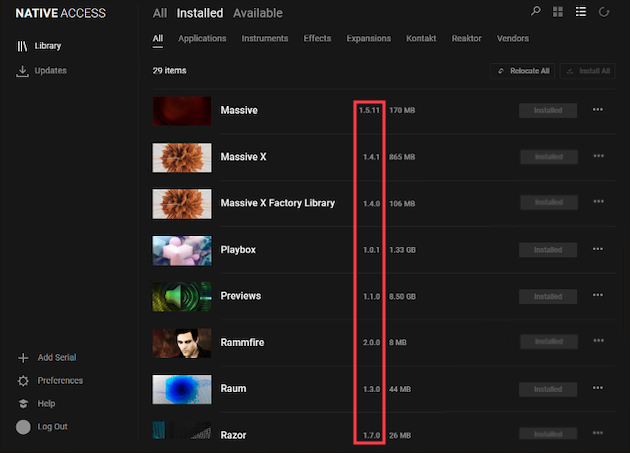
Was this article helpful?
That’s Great!
Thank you for your feedback
Sorry! We couldn't be helpful
Thank you for your feedback
Feedback sent
We appreciate your effort and will try to fix the article