The Warning Triangle on my TRAKTOR KONTROL S4 / S2 / Z2 is Flashing
The Alert Indicator flashes if one of the issues described below has been detected.
The Load in TRAKTOR is Too High
This might happen if you are running TRAKTOR on a computer that is at the lower limit of the system requirements or if your system is having latency issues. In order to resolve this, open the Audio Setup tab in the TRAKTOR Preferences and increase the Buffer Size.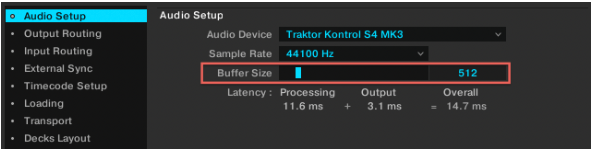
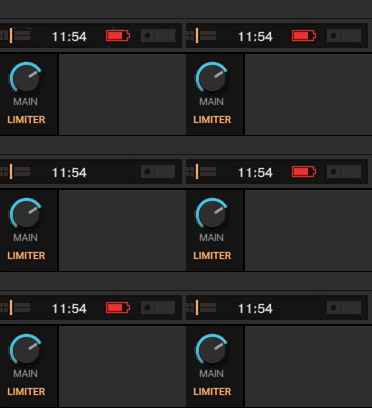
Your Laptop is Running on Battery Supply
We highly recommend operating your laptop on its dedicated power supply only. Many laptops will run on different energy-saving settings when the power supply is not attached, which may affect the performance of TRAKTOR.
TRAKTOR's Main Volume or Headphone Volume is Too Low
Make sure that neither the MAIN knob nor the headphone VOL knob below the right deck is set too low. The alert will only be triggered if the levels are near the minimum.
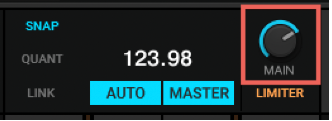
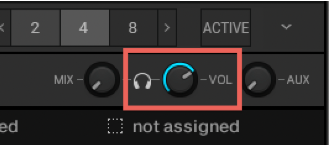
Note: When using the S4 MK3, the Mix / Headphone / Aux section will be greyed out, as the device is equipped with its own Cue section, thus it is not processed in the application itself.
Was this article helpful?
That’s Great!
Thank you for your feedback
Sorry! We couldn't be helpful
Thank you for your feedback
Feedback sent
We appreciate your effort and will try to fix the article